

Reqnroll IDE Support is now available in preview for Visual Studio, Visual Studio Code, and JetBrains Rider. It brings Reqnroll-aware editing to all three IDEs, with a consistent set of modern features—and we’d love for you to try it and tell us what you think.
The Visual Studio Code and Rider extensions work on Windows, macOS, and Linux.
Until now, Reqnroll IDE support has been centered on separate integrations, while VS Code users relied on limited Gherkin support from the Cucumber extension. The new Reqnroll IDE Support brings native Reqnroll support to VS Code and a refreshed experience to Visual Studio and Rider.
This is a preview, provided alongside the existing integrations—not a forced migration. In Visual Studio and Rider, you can keep both the preview and current integration installed, but only enable one at a time to avoid conflicting editor features. In VS Code, the Reqnroll extension replaces the previous recommendation to use the generic Cucumber plugin. Try the new support and switch back if it does not yet fit your workflow. As the preview matures, our plan is for it to replace the current integrations.
What’s new
Our primary goal was to provide a consistent Reqnroll experience across all three IDEs, backed by a shared codebase that we can improve and maintain together. Along the way, we’ve also brought in new capabilities and improvements that go beyond simply matching the existing integrations.
Native Reqnroll support in VS Code
VS Code now has its own Reqnroll extension, rather than relying on the generic Cucumber plugin for limited .feature file support. It provides Reqnroll-aware syntax highlighting, diagnostics, completion, navigation, and refactoring, and discovers project membership from your project files without manual Cucumber glob settings. See the installation guide to get started.
See step status as you work—without a build
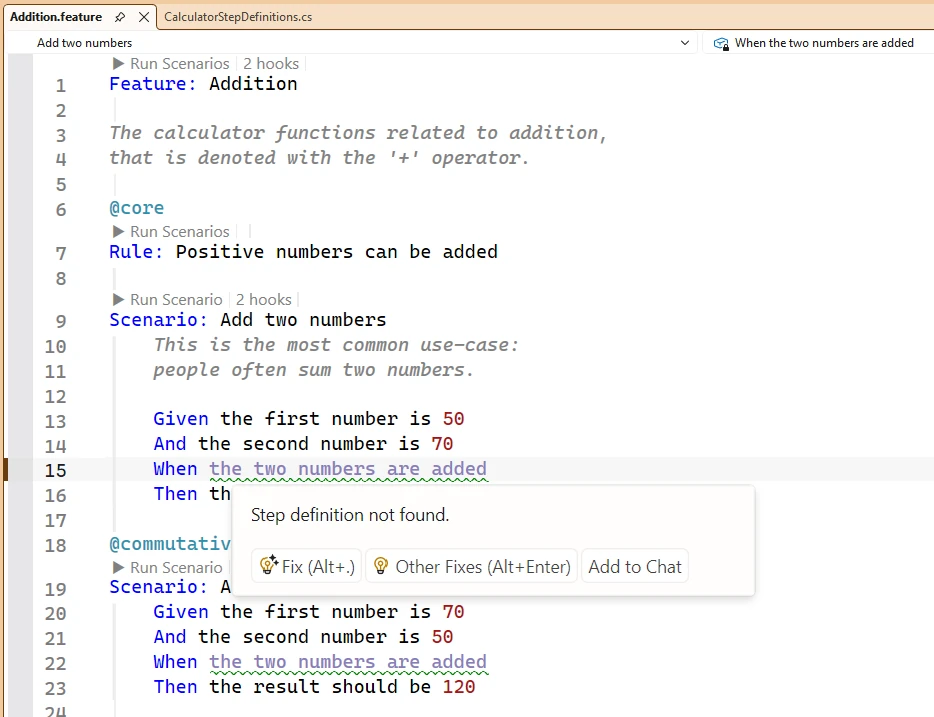
Step status updates as you edit. Add or change a step definition and the related steps in your feature files reflect the change in their coloring—without needing to build the project or reopen the files. Unmatched steps are easy to spot, and their status updates when a matching binding is added. Learn more about live highlighting and diagnostics.
Understand step and hook usage at a glance
Code Lens annotations show how many feature-file steps use a step definition, which hooks apply to a feature or scenario, and which scenarios a hook matches. Follow an annotation to inspect the matching steps or hooks and navigate to the relevant code.
Run scenarios from feature files
Run scenarios directly from a feature file, and debug them where the IDE integration supports it—without first hunting for the generated test method. Visual Studio and Rider provide Reqnroll Run/Debug actions on scenarios. In VS Code, scenario execution is available through the C# Dev Kit’s Test Explorer and CodeLens on the generated test. See the running scenarios guide for IDE-specific details.
Rename steps, including parameterized steps
Rename a step from the feature file or its binding and update its occurrences across your project. The improved rename support also handles parameterized steps, so changing a step’s wording does not leave matching usages behind. See the Rename Step guide.
Navigate large feature files
Use IDE outline and structure views to see a feature’s hierarchy and jump directly to a scenario or step. Reqnroll also makes it easier to move between feature steps, their definitions, and hooks with navigation features. Outline availability varies by IDE: VS Code and supported Rider versions provide a feature-file outline.
Try the preview
Install the preview for your IDE using the installation guide, and see the feature documentation for more details. You can find the current builds and updates on the Reqnroll.IdeSupport releases page.
Because the preview runs alongside the existing integrations, you can switch back whenever you need to: disable the preview and re-enable your current integration.
Your feedback matters
This is an early preview, and your experience will help us shape the future of Reqnroll IDE support. Please try it in your day-to-day work and let us know what works well, what is missing, or where you run into problems. Share feedback or report issues in the Reqnroll.IdeSupport GitHub repository.
We’re excited to bring a more consistent Reqnroll experience to all three IDEs. Give the preview a try—and help us make it better!
Reqnroll IDE Support was primarily created by Chris Rudolphi—thank you for leading the development of this new tool. Special thanks to Thomas Heijtink for the inspiration, and to all the contributors who helped bring it to the Reqnroll community.